Why does Power BI hate many-to-many relationships?
Despite the title (that did its job in getting your attention) many-to-many relationships *-* are not necessarily evil. However, modeling your data in a manner that avoids many-to-many relationships helps in a lot of scenarios with data consistency, among other things.
Let’s dive into this using the ancient author-book example.
I have added the T-SQL scripts so you can follow along if you want. Strap on folks, it will be a long and a bumpy ride.
Let’s start with creating a table for the authors, inserting two authors and check the table out.
--Data modeling example about handling many-to-many relationships with a junction table.
--Creating table for authors of books.
CREATE TABLE TEST.DataModeling.Authors
	(
		AuthorName VARCHAR(400) PRIMARY KEY,
		Nationality VARCHAR(400)
	)

	--Inserting 2 authors into the Authors table.
INSERT INTO TEST.DataModeling.Authors VALUES
	('David', 'NL'), ('Harry', 'EN')

--Checking out the table.
SELECT * FROM TEST.DataModeling.Authors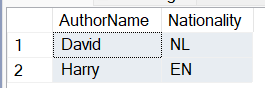
Now let’s create the table for books, insert three books and check the table out.
--Creating table for books.
CREATE TABLE TEST.DataModeling.Books
	(
		BookTitle VARCHAR(400) PRIMARY KEY,
		Pages INT,
		AuthorName VARCHAR(400)
	)

	--Inserting 3 books into the Books table.
INSERT INTO TEST.DataModeling.Books VALUES
	('David book 1', 10, 'David'), ('David book 2', 20, 'David'), ('Harry book', 30, 'Harry')

--Checking out the table.
SELECT * FROM TEST.DataModeling.Books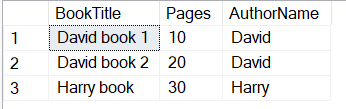
Looking good so far. However, what if we have a book with two authors?
--So far so good. However, what if authors David and Harry are BOTH author of a book? Now things will get tricky.
INSERT INTO TEST.DataModeling.Books VALUES
	('David & Harry book', 40, 'David & Harry')

--Checking out the table: we have a problem. Value "David & Harry" in column "AuthorName" from table "Books" does not exist in table "Authors".
--Inserting value "David & Harry" in table "Authors" would introduce a host of problems: do we add extra columns for Nationality since David and Harry have different nationalities? Not really a scalable solution.
--Now imagine you have a third book that is written by good ol' Harry and a new author. Do we add two rows in the "Authors" table? One for the new author and one for the combination of Harry and the new author?
--How do we use these tables to answer questions from the business like: how many authors are there? A simple COUNT(*) of the "Authors" table returns wrong results.
--COUNT(DISTINCT AuthorName) returns wrong results as well! Also queries to identify the contribution of individual authors become complex without manual parsing.
SELECT * FROM TEST.DataModeling.Books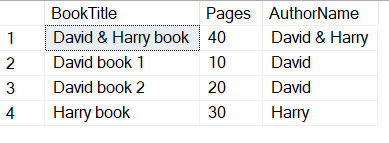
As described in the comments in the block of code above, we have a problem. Things got a whole lot more complicated. We can however solve this and create a more flexible data model by creating a junction table (also called a bridge table). In this case, a junction table is a combination of all existing combinations between books and authors. Let’s try and make this happen.
--Starting with a clean slate, let's empty the "Books" table.
TRUNCATE TABLE TEST.DataModeling.Books

--The next step is to remove the "AuthorName" column from the "Books" table. We now have an empty "Books" table with only the columns "BookTitle" and "Pages".
ALTER TABLE TEST.DataModeling.Books DROP COLUMN AuthorName

--Authors table remains the same.

--Insert the existing books into the "Books" table.
INSERT INTO TEST.DataModeling.Books (BookTitle, Pages) VALUES
	('David book 1', 10),
	('David book 2', 20),
	('Harry book', 30),
	('David & Harry book', 40)

--Checking out the new "Books" table.
SELECT * FROM TEST.DataModeling.Books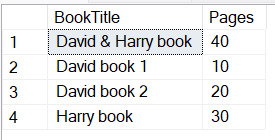
As you can see above, in order for us to be able to create a junction table, we first need to alter the “Books” table. We truncated the “Books” table and dropped the column “AuthorName”. Let’s also take a peek at what the unchanged “Authors” table looks like.
--Checking out the unchanged "Authors" table.
SELECT * FROM TEST.DataModeling.Authors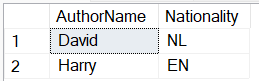
Looking good. Next step is to create the junction table: the table where the existing combinations of books and authors will live.
--Now let's create the junction table called "BookAuthors".
CREATE TABLE TEST.DataModeling.BookAuthors
(
    BookTitle VARCHAR(400),
    AuthorName VARCHAR(400),
    CONSTRAINT PK_BookAuthors PRIMARY KEY (BookTitle, AuthorName),
    CONSTRAINT FK_BookAuthors_Books FOREIGN KEY (BookTitle) REFERENCES TEST.DataModeling.Books(BookTitle),
    CONSTRAINT FK_BookAuthors_Authors FOREIGN KEY (AuthorName) REFERENCES TEST.DataModeling.Authors(AuthorName)
)

-- Insert the relationships between books and authors into the junction table.
INSERT INTO TEST.DataModeling.BookAuthors (BookTitle, AuthorName) VALUES
	('David book 1', 'David'),
	('David book 2', 'David'),
	('Harry book', 'Harry'),
	('David & Harry book', 'David'),
	('David & Harry book', 'Harry')

--Checking out the junction table "BookAuthors.
SELECT * FROM TEST.DataModeling.BookAuthors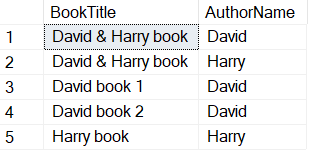
That is more like it. Now most questions from the business can be answered in an easy manner. For example, would you like to know how many authors there are?
--How many authors are there? A simple COUNT(*) will answer this question.
SELECT COUNT(*) AS COUNT_AUTHORS FROM TEST.DataModeling.Authors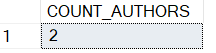
What about how many books there are?
--How many books are there? A simple COUNT(*) will answer this question.
SELECT COUNT(*) AS COUNT_BOOKS FROM TEST.DataModeling.Books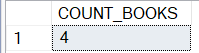
Let’s see how many books were written bij author David.
--Show me all books by a certain author.
SELECT
	BookAuthors.AuthorName,
	Books.BookTitle
FROM TEST.DataModeling.BookAuthors
JOIN TEST.DataModeling.Books ON BookAuthors.BookTitle = Books.BookTitle
WHERE BookAuthors.AuthorName = 'David'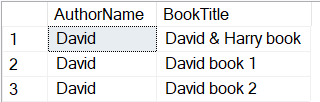
Let’s turn it around! Which author(s) wrote the book “David & Harry book”?
--Show me all authors that have written a certain book.
SELECT
	Authors.AuthorName,
	Authors.Nationality
FROM TEST.DataModeling.Authors
JOIN TEST.DataModeling.BookAuthors ON Authors.AuthorName = BookAuthors.AuthorName
WHERE BookAuthors.BookTitle = 'David & Harry book'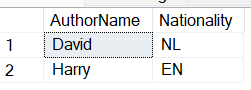
Pretty nifty, indeed!
For your convenience, I have gathered all the T-SQL statements from above into a single script which can be found below.
--Data modeling example about handling many-to-many relationships with a junction table.

--Drop junction table in order to be able to create the "Authors" and "Books" tables anew (avoiding the error: "cannot drop table because it is references by a FOREIGN KEY constraint")
DROP TABLE IF EXISTS TEST.DataModeling.BookAuthors

--Creating table for authors of books.
DROP TABLE TEST.DataModeling.Authors

CREATE TABLE TEST.DataModeling.Authors
	(
		AuthorName VARCHAR(400) PRIMARY KEY,
		Nationality VARCHAR(400)
	)

--Inserting 2 authors into the Authors table.
INSERT INTO TEST.DataModeling.Authors VALUES
	('David', 'NL'), ('Harry', 'EN')

--Checking out the table.
SELECT * FROM TEST.DataModeling.Authors

--Creating table for books.
DROP TABLE TEST.DataModeling.Books

CREATE TABLE TEST.DataModeling.Books
	(
		BookTitle VARCHAR(400) PRIMARY KEY,
		Pages INT,
		AuthorName VARCHAR(400)
	)

--Inserting 3 books into the Books table.
INSERT INTO TEST.DataModeling.Books VALUES
	('David book 1', 10, 'David'), ('David book 2', 20, 'David'), ('Harry book', 30, 'Harry')

--Checking out the table.
SELECT * FROM TEST.DataModeling.Books

--So far so good. However, what if authors David and Harry are BOTH author of a book? Now things will get tricky.
INSERT INTO TEST.DataModeling.Books VALUES
	('David & Harry book', 40, 'David & Harry')

--Checking out the table: we have a problem. Value "David & Harry" in column "AuthorName" from table "Books" does not exist in table "Authors".
--Inserting value "David & Harry" in table "Authors" would introduce a host of problems: do we add extra columns for Nationality since David and Harry have different nationalities? Not really a scalable solution.
--Now imagine you have a third book that is written by good ol' Harry and a new author. Do we add two rows in the "Authors" table? One for the new author and one for the combination of Harry and the new author?
--How do we use these tables to answer questions from the business like: how many authors are there? A simple COUNT(*) of the "Authors" table returns wrong results.
--COUNT(DISTINCT AuthorName) returns wrong results as well! Also queries to identify the contribution of individual authors become complex without manual parsing.
SELECT * FROM TEST.DataModeling.Books

--An elegant way of solving this, is by creating a junction table.

--Starting with a clean slate, let's empty the "Books" table.
TRUNCATE TABLE TEST.DataModeling.Books

--The next step is to remove the "AuthorName" column from the "Books" table. We now have an empty "Books" table with only the columns "BookTitle" and "Pages".
ALTER TABLE TEST.DataModeling.Books DROP COLUMN AuthorName

--Authors table remains the same.

--Insert the existing books into the "Books" table.
INSERT INTO TEST.DataModeling.Books (BookTitle, Pages) VALUES
	('David book 1', 10),
	('David book 2', 20),
	('Harry book', 30),
	('David & Harry book', 40)

--Checking out the new "Books" table.
SELECT * FROM TEST.DataModeling.Books

--Checking out the unchanged "Authors" table.
SELECT * FROM TEST.DataModeling.Authors

--Now let's create the junction table called "BookAuthors".
CREATE TABLE TEST.DataModeling.BookAuthors
(
    BookTitle VARCHAR(400),
    AuthorName VARCHAR(400),
    CONSTRAINT PK_BookAuthors PRIMARY KEY (BookTitle, AuthorName),
    CONSTRAINT FK_BookAuthors_Books FOREIGN KEY (BookTitle) REFERENCES TEST.DataModeling.Books(BookTitle),
    CONSTRAINT FK_BookAuthors_Authors FOREIGN KEY (AuthorName) REFERENCES TEST.DataModeling.Authors(AuthorName)
)

-- Insert the relationships between books and authors into the junction table.
INSERT INTO TEST.DataModeling.BookAuthors (BookTitle, AuthorName) VALUES
	('David book 1', 'David'),
	('David book 2', 'David'),
	('Harry book', 'Harry'),
	('David & Harry book', 'David'),
	('David & Harry book', 'Harry')

--Checking out the junction table "BookAuthors.
SELECT * FROM TEST.DataModeling.BookAuthors

--Now we have a data model that allows for easy answers to most business questions.
--How many authors are there? A simple COUNT(*) will answer this question.
SELECT COUNT(*) AS COUNT_AUTHORS FROM TEST.DataModeling.Authors

--How many books are there? A simple COUNT(*) will answer this question.
SELECT COUNT(*) AS COUNT_BOOKS FROM TEST.DataModeling.Books

--Show me all books by a certain author.
SELECT
	BookAuthors.AuthorName,
	Books.BookTitle
FROM TEST.DataModeling.BookAuthors
JOIN TEST.DataModeling.Books ON BookAuthors.BookTitle = Books.BookTitle
WHERE BookAuthors.AuthorName = 'David'

--Show me all authors that have written a certain book.
SELECT
	Authors.AuthorName,
	Authors.Nationality
FROM TEST.DataModeling.Authors
JOIN TEST.DataModeling.BookAuthors ON Authors.AuthorName = BookAuthors.AuthorName
WHERE BookAuthors.BookTitle = 'David & Harry book'