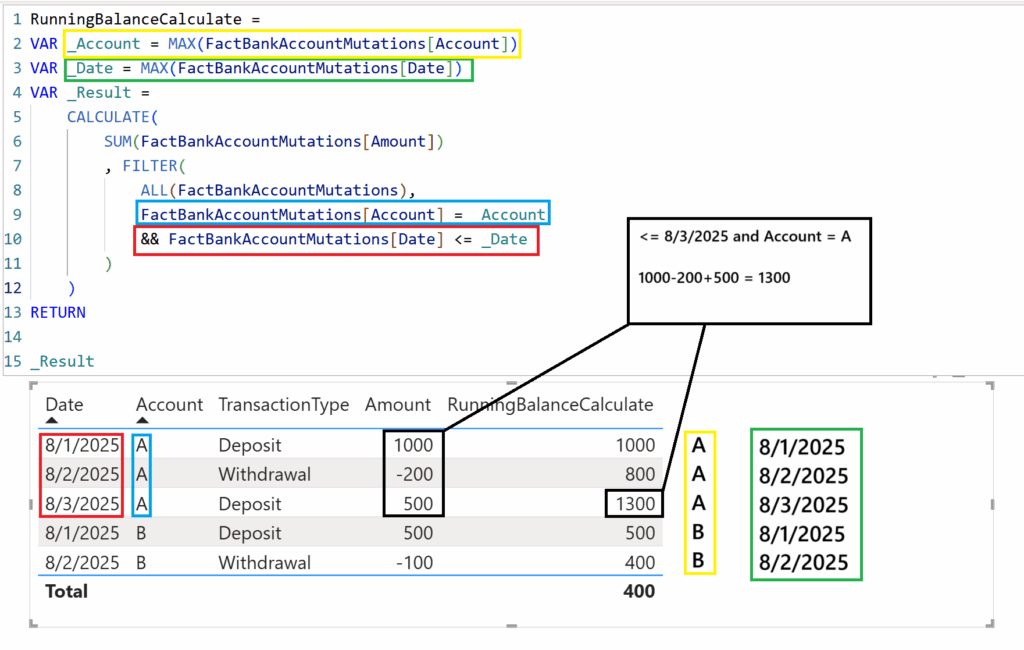
In the last post we calculated the running total of bank account transactions (withdrawals and deposits) using a calculated column in Power BI. In the image below we use a measure with the function CALCULATE.
Zooming in on the RunningBalanceCalculate value of “1300”. The first three rows adhere to the filter condition “<= _Date” and also the filter condition “= _Account”. After all, the dates of the first three rows are all smaller than 8/3/2025 and they all share the account “A”.
The same dynamic goes for the values produced by the measure RunningBalanceCalculate.